Classes
 Classes
Classes represent student cohorts associated with departments/programs who attend lectures or sit for examinations.
Data Fields
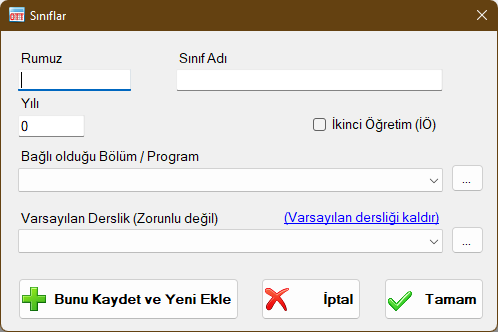
Class Name
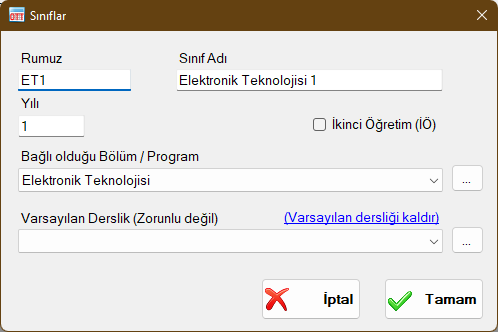
Enter a descriptive name indicating the Department/Program, Year, and Daytime/Evening status (e.g., "Electronics 1", "Electronics 1-Eve"). Clear naming prevents scheduling errors and simplifies management.
Code / Abbreviation (Rumuz)
A concise code of a few letters identifying the class (e.g., "ET1" or "ET1-EVE"). Used in schedule headers, compact views, and reports.
Year
Indicates the academic grade/year of the class. Only courses defined for this year under the associated department will appear in the course pool for this class. For sectioned classes, multiple class records can be created for the same year (e.g., "Electronics 1-A", "Electronics 1-B").
Evening / Secondary Education
Check this box if the class is an evening education cohort. Evening classes can only be scheduled into time slots designated for evening education. In addition, report outputs and faculty teaching load summaries separate daytime and evening hours automatically.
Associated Department / Program
The parent Department / Program to which this class belongs. Only courses defined under this Department / Program will be listed under the class.
Default Classroom
An optional setting allowing you to assign a default room to the class. When placing courses for this class onto the weekly schedule, the default classroom is assigned automatically. This assignment can still be overridden on the table at any time. If no default classroom is assigned, courses are placed without room assignments until assigned manually.
Note: This setting applies only to Weekly Class Schedules and is not used in Exam Schedules.
Department / Program and Class Relationships
As shown below, classes are defined under departments/programs, and curriculum courses defined for a department/program appear under all classes linked to it.

Class Windows
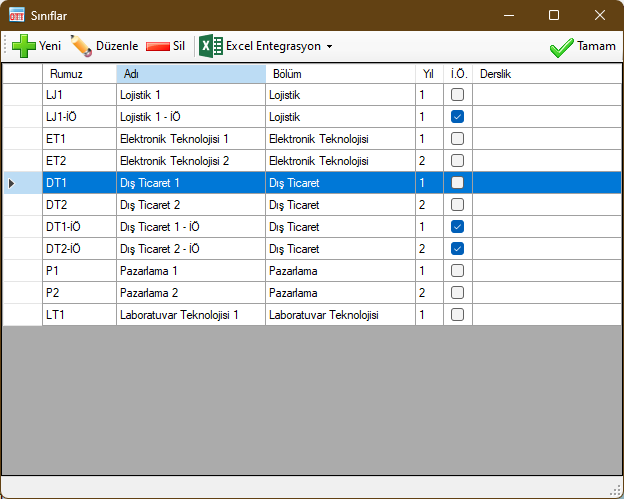
 New: Used to create a new class record and assign it to a Department / Program.
 Edit: Modifies the selected class record. Changes update across all schedule views and reports immediately.
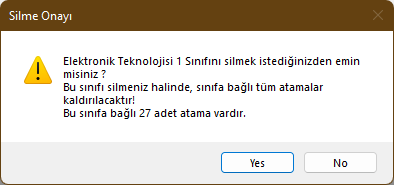
 Delete: Deletes the selected class record. A warning prompt will notify you if scheduled course or exam placements exist for this class. Confirming will delete the class and all its schedule placements.
 Excel Integration: Enables two-way data exchange with Microsoft Excel™. Export current class records to Excel or import bulk class lists directly. Microsoft Excel must be installed on your computer.
 Generate Excel Template: Produces a pre-structured Microsoft Excel™ workbook with dedicated columns for entering class information.
 Export Data to Excel: Exports all records visible in this window to Microsoft Excel™.
 Import Data from Excel: Imports class records from an Excel template file. Valid rows are added automatically, while rows with invalid data are highlighted with red cell shading and explanation notes.
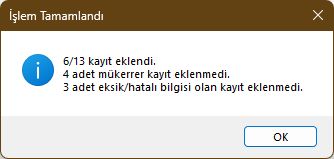
Validation rules for Class records:
- Code / Abbreviation cannot be blank
- Class Name cannot be blank
- Year must be an integer greater than zero
- A valid, existing Department Name must be specified
- Evening Education must be left blank or contain "Yes" ("Evet")
Records failing these rules are rejected. Duplicate records matching existing Code, Name, Year, Evening Education status, and Department are skipped automatically.
Created with the Personal Edition of HelpNDoc: Qt Help documentation made easy