License Information
 License Information
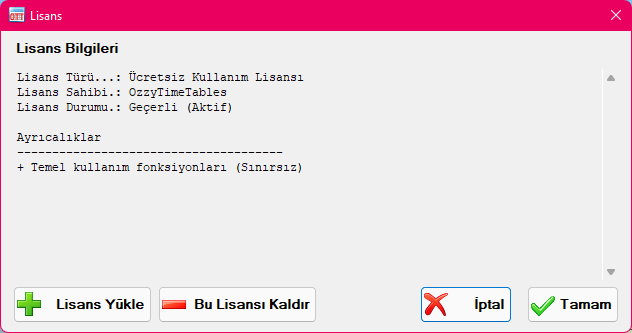
Basic usage of the application is completely free of charge with no time limitations. However, registering as a licensed user provides valuable additional benefits.
License Types
Free Usage License
The Free Usage License allows you to use the software indefinitely without any time expiration. No registration or activation is required; the application installs with this license by default. If you ever remove an installed commercial license, the Free Usage License is reinstated automatically, ensuring continuous access to all core scheduling functions.
Registered User License
The Registered User License replaces the default "©OzzyTimeTables" watermark on report outputs with your official school/institution name. Core application functionality remains identical. Follow the instructions on the application website to activate a Registered User License.
Premium / Privileged User License
In addition to custom report branding, the Premium User License unlocks enhanced functional features and advanced optimization modules. For current details on premium features, please visit the application website.
Installing a License
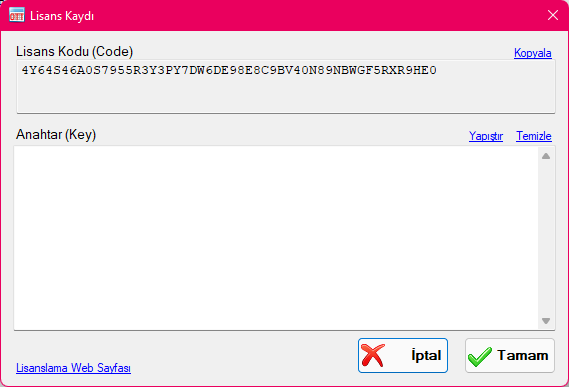
To activate a license, click "Install License" to open the dialog shown below. Following the website instructions, copy your machine's "License Code" and submit it on the web portal. Your activation key will be delivered to your registered email address. Paste the key into the "Key" box and click "OK". Ensure the key is copied in full without extraneous spaces or missing characters to avoid invalid key errors.
Removing a License
To uninstall an active license, click "Remove This License". The system immediately reverts to the default Free Usage License. If you retain your license key, you may reinstall it on the same computer at any time.
Created with the Personal Edition of HelpNDoc: Maximize Your Productivity with a Help Authoring Tool